Clients overview
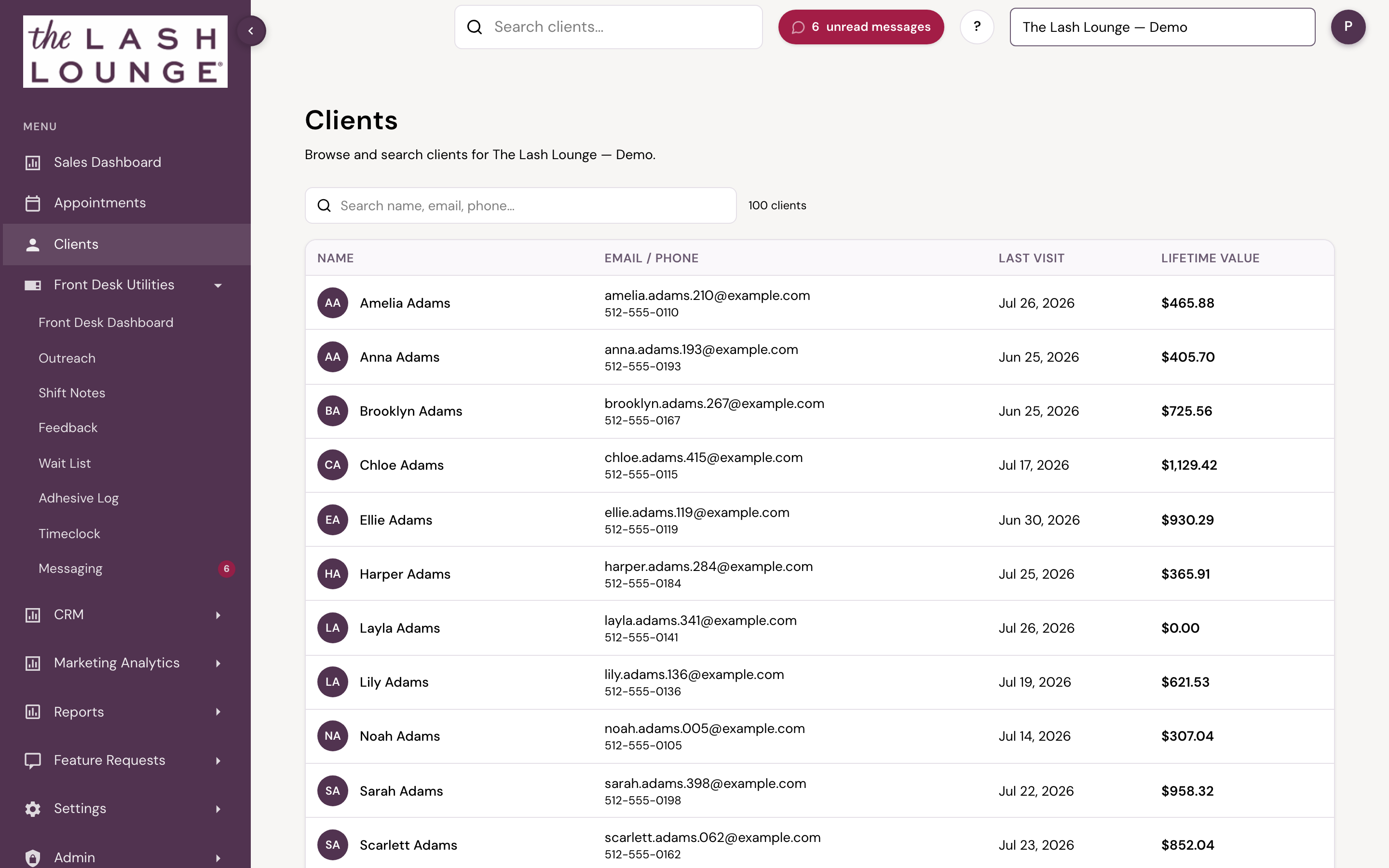
Clients is the client directory — its own top-level spot in the sidebar. Search by name, email, or phone and jump straight into any guest's Client 360 profile.
 12
1SearchingSearch by name, email, or phone.2ColumnsClient, Email/Phone, Last visit, and Lifetime value.
Searching
Type into the search box to filter the directory by name, email, or phone — results update as you type. A running count above the table shows how many clients match.
Columns
| Column | What it shows |
|---|---|
| Client | The client's name and avatar initials. Inactive clients carry an Inactive label. |
| Email / Phone | The client's contact info, if on file. |
| Last visit | The date of the client's most recent visit, or Never if they haven't been in yet. |
| Lifetime value | What the client has actually paid for services, the same figure as Spend on the Lifetime Value of Member report (a Lash Lounge report): the real money the client has paid for services and memberships, before sales tax. Deposits, payments on account and gift card purchases are counted once, when the client pays for them. Retail, tips and card convenience fees are not included. |
Click any row to open that client's Client 360 profile.
Who sees it
The Clients directory opens for staff with CRM access, and for corporate and admin users automatically. Staff without it won't see the Clients button at all — client records stay private.
Who sees this
Available to staff with CRM access. Corporate and admin users get access automatically.