Member Report
The Member Report is a cross-system snapshot of memberships. Each row is one member at a location and shows the membership they held at the start and end of the selected period, qualifying member services, current status, next autopay, and lifetime spend.
The report currently covers The Lash Lounge and Frenchies locations that sell memberships.
Bishops shops aren't included — Bishops doesn't sell memberships.
Find it in Salon Reports under Members (Studio Reports at Frenchies).
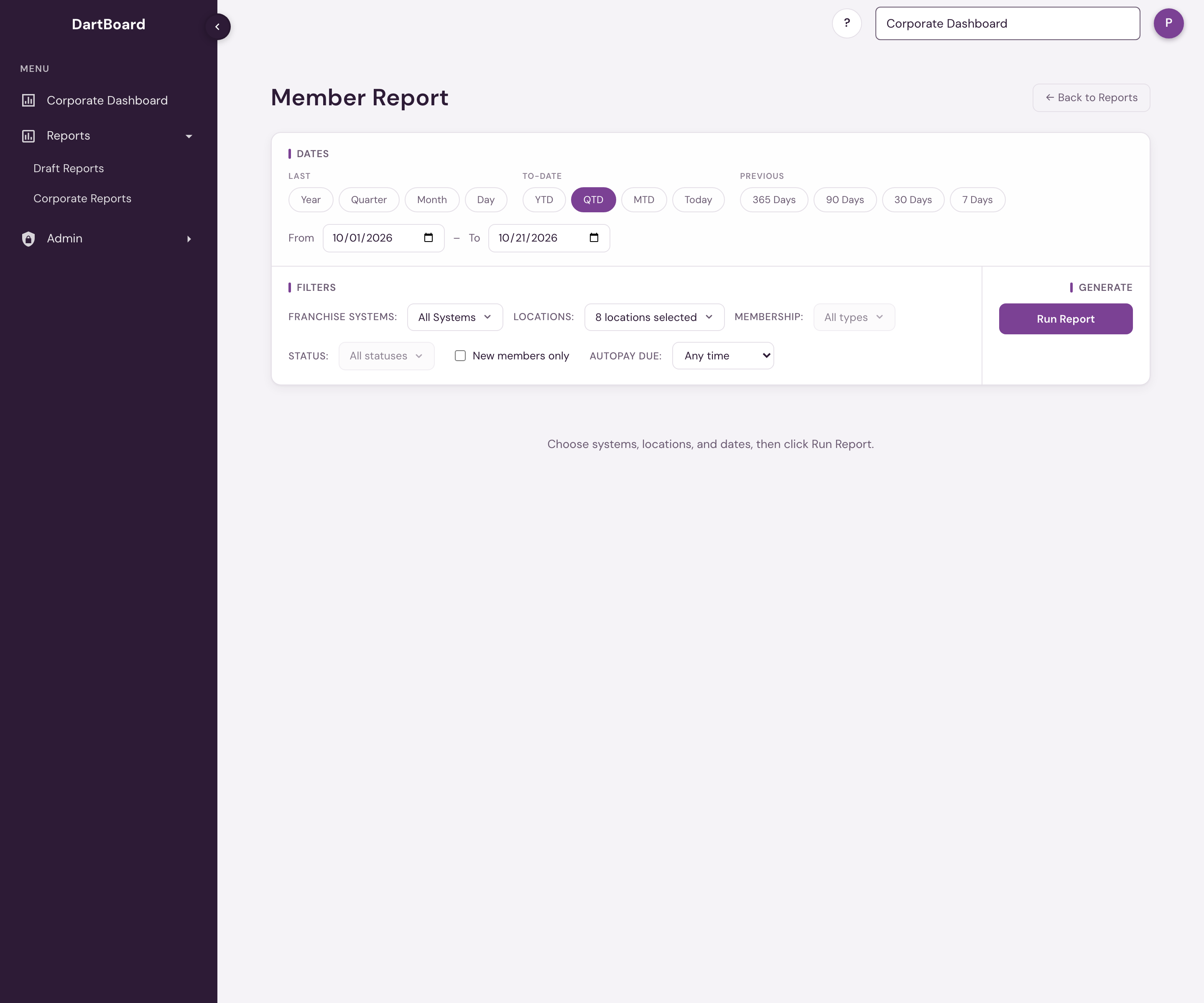
Running the report
Choose one or more Franchise Systems and Locations, set a start and end date, and click Run Report. The selectors only show membership-enabled systems and locations available to your account. Choosing All means all available locations you are authorized to report on, not every salon in salon360.
Changing the system selection narrows the location choices. If a saved link or request includes a system or location outside your access, the report does not return that location's data; select from the choices shown and run it again.
The date range does two things. First, it decides who appears: the report lists members whose membership was in effect at some point during the window you pick, so a membership that ended before your start date won't show. At a Frenchies studio each row is a membership, not a guest: one that was active at some point in the window, was on hold during it (with the hold begun in the 180 days before the window or inside it), or had its billing cancelled but had not yet reached its end date. A guest holding two memberships has two rows. At The Lash Lounge each member appears once, even if they changed plans during the window. Second, it sets the period columns — Membership at Start, Membership at End and New Member. Current Status, the autopay columns and Lifetime Spend are as of today and do not follow the date range; the Member Services columns are described below. When your dates end in a month that has already closed, a Status at End column also appears, and for The Lash Lounge the report lists everyone counted as an Active member for that month.
Filtering the list
Four filters sit next to the dates and narrow the list to the members you need. They take effect when you click Run Report, and you can combine them: a member has to match every filter you set.
- Membership: one or more membership types. A member matches on the membership they held at the end of your dates (the Membership at End column), or, if their membership ended during your dates, the last one they held. A member who changed plans during your dates counts under the plan they ended on. At Frenchies each row is one membership, and it matches on its own plan whatever its status, so a membership that is on hold or cancelled is found under its plan too. The choices are the memberships held by members in your last run, so run the report once before you pick.
- Status: one or more statuses, such as Active or Suspended. A member matches on Current Status, or on Status at End when your dates end in a month that has closed.
- New members only: only members marked Yes under New Member.
- Autopay due: only members whose Next AutoPay Date falls in the next 7, 14 or 30 days, counting today.
A line above the table names the filters in use. The table, the CSV download and the Active Members, Suspended, Billing Suspended, Declined and Member Services tiles all cover just the members who match. True Terminations reads Not available with filters, because it counts memberships that ended rather than the members listed. At Frenchies, New Members is a count of memberships sold, so it is not available with filters either; at The Lash Lounge it counts the matching members marked Yes.
Columns
| Column | What it shows |
|---|---|
| Client ID | The member's ID in the booking system: the Mindbody client ID for The Lash Lounge, the Zenoti guest code for Frenchies. |
| Client Name | The member's first and last name. A Frenchies member whose profile is kept at another studio shows the name and contact details from that studio, and a member who is on the studio's staff shows the details from their staff record. |
| Membership at Start | The membership the guest held on the first day of the selected range. Blank means they joined during the range. At Frenchies the plan shows only if that membership was active on that day, so blank can also mean it was on hold or cancelled then. |
| Membership at End | The membership the guest held on the last day of the selected range. Blank means their membership ended (or was terminated) during the range. A different plan from Membership at Start means they changed plans during the range. At Frenchies the plan shows only if that membership was active on that day, so blank can also mean it was on hold or cancelled then; Status at End and Current Status tell these apart. |
| Member Services Completed | Qualifying member services completed at this location. For The Lash Lounge, these are completed refill-category services. For Frenchies, these are services redeemed with a membership credit on closed invoices, under any membership the guest has held at the studio, the same rule as the Membership redeemed figure on the Zenoti Business KPI report. This is a lifetime count and is not limited by the date range. |
| Member Services Scheduled | Qualifying member services booked ahead at this location. For The Lash Lounge, these are future, non-cancelled refill-category bookings. Frenchies shows — because credit redemption is not known until after the service. |
| Phone | The member's mobile number. |
| Email Address | The member's email. |
| Joined On | For The Lash Lounge, the date of the member's first appointment. For Frenchies, the date the guest's first membership at the studio started. |
| Location | The salon where this membership is held. A member with memberships at more than one selected location appears once for each membership and location; rows are not combined across salons. |
| Next AutoPay Date | The member's next scheduled membership draft, from today onward. Blank for a member whose membership has ended, frozen, or had autopay switched off — your point-of-sale leaves those drafts on the schedule, but they won't collect. At Frenchies a draft that is waiting to be retried counts as scheduled. |
| Next AutoPay Amount | The total amount of that next draft (all line items on that date combined). At Frenchies it is the draft for that row's membership. |
| Lifetime Spend | What the member has actually paid at this location, across their entire history here. At The Lash Lounge it counts real money only — card, cash and bank payments — before sales tax, and leaves out tips and card convenience fees, the same way collections are counted on the Sales Dashboard. A gift card or account credit counts when it was bought, not again when it is spent, and a refund to a card comes off. At Frenchies it is also what the member paid, counted the way the point of sale counts collections: money taken by card, cash, check or custom payment, with sales tax and tips left out and refunds taken off. Membership dues and gift card purchases count when they are paid, and a service later covered by membership credit or a gift card adds nothing, so that money is counted once. See revenue and collections. |
| New Member | Yes if the client became a member during the selected range: a membership started in the range, it is still running at the end of the range, and they had no membership that ended in the 12 months before; otherwise No. A membership cancelled in the month it started, or before it started, is not counted. This can differ from Joined On: a member returning after more than 12 months away shows as a New Member. |
| Status at End | Shown only when your dates end in a month that has already closed: the member's standing at the end of those dates. At The Lash Lounge, Suspended is a member on hold on the last day of your dates; Active is a member who paid dues in the month your dates end in (a payment of more than $0), was not on hold on that month's last day, and on that day held a membership or was between memberships with the next one already signed, the way Systemwide Data and the Sales Dashboard count a past month; Terminated or Expired is a membership that had ended by then; No Autopay This Month is a membership that was still within its dates but paid no dues that month, so it is not counted as Active for it. Declined is never shown here. For Frenchies it appears when your dates end before yesterday, and shows the membership's standing at the end of your dates by the same rules as Current Status. |
| Current Status | The member's standing today, whatever date range you pick. At The Lash Lounge: Active is a membership running today with autopay active, or a member who has given notice and hasn't reached their termination date, and not on hold; a member between memberships with the next one already signed is Active too. It is the same rule as Active Members on the Sales Dashboard and in Systemwide Data. Suspended is a member with a membership on hold today, by the same Suspended rule as the Sales Dashboard and Systemwide Data; a member who is Active is never also Suspended. Declined is a membership in effect today whose autopay was declined; a declined member is not counted as Active. Everyone else takes the standing of their live membership (the one that is not terminated and not past its end date, or if none is live, the latest to start): Terminated, Expired when it is past its end date (a membership on hold that has passed its end date is Expired, not Suspended), or Not Started when it begins on a later date (rarely, Unknown if no membership record can be matched). At Frenchies the statuses are Active, Suspended, Billing Suspended, Recurring Cancelled, Terminated and Expired, by the Frenchies rules: Active is a membership the point of sale shows as active; Suspended is a membership that is frozen (on hold at the guest's request); Billing Suspended is one suspended because a payment failed, which is neither Active nor Suspended; Recurring Cancelled is a cancelled membership that has not yet reached its end date (still a membership, but it will not renew); Terminated is a cancelled membership past its end date; and Expired is anything else, including a hold that began more than 180 days ago with no payment scheduled. This is as of today, whatever date range you pick. A newer membership that was terminated while an older one kept billing does not make the member Terminated. |
| Comments | Notes about the membership — for example, a scheduled upcoming suspension and its start date. Blank for Frenchies. |
The numbers above the table
| Tile | What it counts |
|---|---|
| Active Members | Members on the list who are Active: today when your dates end in the current month, or at the end of your dates when they end in a month that has closed. |
| Suspended | Members on the list who are Suspended, read on the same day as Active Members. |
| Billing Suspended | Frenchies memberships on the list that are suspended for a failed payment, read on the same day as Active Members. Shown when a Frenchies studio is in the run. |
| Declined | Members on the list whose Current Status is Declined today. The Lash Lounge only, so it is not shown on a Frenchies-only run. Not available when your dates end in a month that has closed. |
| New Members | Members who became a member during the selected dates: the rows that say Yes under New Member. For Frenchies it is the number of memberships sold in the dates, the same count as Systemwide Data. |
| True Terminations | Members whose membership ended during the selected dates and who did not continue. A member continues when another membership of theirs at the salon is still running after that day, starts within 31 days of it, or was signed within 31 days of it. A membership that ends on its end date with nothing after it is a termination too. This is the same count as True Terminations in Systemwide Data. See True Terminations. |
| Member Services Completed / Scheduled | The totals of those two columns. |
New Members and True Terminations follow the dates you pick. With filters set, the tiles cover only the matching members. Active Members, Suspended and Declined are as of today when your dates end in the current month, and each is a count of the rows with that Current Status, so sorting the table by it shows exactly who is behind the number. When your dates end in a month that has closed, Active Members and Suspended are read at the end of your dates and count the rows with that Status at End; the tile says At the end of and the date.
For The Lash Lounge, when your dates include today, Active Members is the same number as Active Members on the Sales Dashboard and in Systemwide Data for the same locations. When your dates end earlier in the current month, the list holds only the members from those dates, so the three status tiles cover just those members and read lower; the tile says Of the members listed, as of today. When your dates end in a month that has closed, Active Members and Suspended are the numbers Systemwide Data and the Sales Dashboard show for that month and the same locations. That holds when your dates end on the last day of the month; for dates that end mid-month, a member who was on hold on your end date and paying again by month end counts as Suspended here.
For The Lash Lounge, Suspended uses the same Suspended rule as the Sales Dashboard and Systemwide Data. A member with one membership on hold and another that is Active counts as Active, here and on those screens. At Frenchies, Active Members and Suspended count memberships by the same rules as the Sales Dashboard and Systemwide Data, so the three show the same numbers for the same studios.
Membership at End is not the Active Members count
For The Lash Lounge, Membership at Start and Membership at End show the membership in force on that date, which includes members whose autopay is suspended or declined. That makes this a roster of everyone holding a membership, so counting Membership at End rows gives a higher number than Active Members, which counts only members who are Active today. For that number, read the Active Members tile, or the rows whose Current Status is Active.
Membership at Start and Membership at End show a plan only while that membership is active (not on hold, cancelled or expired). A membership on hold is still listed, with Suspended or Billing Suspended as its status and those two cells blank. The report lists one row per membership, the way Active Members on the Sales Dashboard and in Systemwide Data counts them, so a guest with two memberships has two rows; their contact details, Joined On, Lifetime Spend and Member Services Completed are the guest's and repeat on each row. There is no Declined status at Frenchies. Member Services Scheduled shows —.
Every column sorts (click a header) and resizes (drag its edge). The download icon above the table delivers the complete member list as a CSV, prepared when the report ran. The table itself shows at most the first 5,000 members; a banner above it says so when a run is larger, and the numbers above the table always cover every member.
Understanding Member Services
Member Services Completed and Member Services Scheduled use the closest membership-service definition each booking system can support:
- The Lash Lounge: Completed counts qualifying refill-category services the member has received; Scheduled counts future, non-cancelled bookings in that category. Add-ons and non-refill services are excluded even when their names look similar.
- Frenchies: Completed counts services redeemed with a membership credit. Scheduled displays — because the booking system records the redemption only after the service, so a future booking cannot yet be identified as a membership-credit service.
An em dash (—) means the metric is unavailable for that system; it does not mean zero. A caption or warning above the results explains when a selected system has partial metric coverage. A numeric 0 means the metric is supported and no qualifying services were found.
For The Lash Lounge, a member with several completed services but zero scheduled is a natural follow-up target — they've been engaged but have nothing qualifying on the books. Do not interpret a Frenchies — in Scheduled as needing follow-up; that metric is unavailable before redemption.
Neither Member Services column is limited by the date range you pick — Completed is a lifetime tally and, where supported, Scheduled counts everything qualifying that is booked ahead, not just inside the selected range. The date range decides who's on the report (members whose membership overlapped the window) and sets Membership at Start, Membership at End and New Member.
Open to the same people as every other report in Salon Reports: corporate and admin users, and anyone with reporting access at a Lash Lounge salon or Frenchies studio that has Reports turned on. A location user sees only their own locations, in the picker and in the totals; corporate and admin users can pick any membership-selling location their account covers. The report lists members' phone numbers and email addresses.